How to Debug Open Graph Tags on Localhost
A practical guide to debugging Open Graph tags on localhost.
You built a page. You added og:title, og:description, and og:image. It looks perfect in your HTML. Then you paste the link into Slack/Twitter/Telegram and… nothing works.
And OpenGraphDebug could help, but it renders only pages that are accessible publicly.
The catch: social platforms can’t access localhost. And even when they can access your server, they often cache previews aggressively.
This post covers practical ways to test Open Graph locally, including tunneling services and a few helpful tools.
Why Open Graph Breaks on Localhost
Most social scrapers run on remote servers. From their point of view:
http://localhost:3000points to their own machine, not yourshttp://192.168.x.xis private network space and usually unreachable- self-signed HTTPS and local DNS tricks often fail validation
So the core problem is simple: your page must be reachable from the public internet to be scraped.
Step 1: Verify Your OG Tags Locally (Before You Tunnel)
Before involving external services, make sure your tags are correct.
- Open the page in your browser
- View source (not DevTools “Elements” only, which might be post-rendered)
- Confirm tags exist in the initial HTML response:
og:titleog:descriptionog:image(absolute URL is safest)og:url(optional but helpful)twitter:cardetc. if you care about Twitter/X
If your OG tags are injected client-side (React only, no SSR), many scrapers will miss them. Open Graph wants server-rendered HTML.
Step 2: Use a Tunneling Service to Expose Localhost
To debug properly, you need a public URL that forwards to your local server.
Option A: ngrok (classic)
- Start your app on
localhost:3000 - Run a tunnel and get a public URL like
https://abc123.ngrok.io - Use that URL in your debuggers
Pros: reliable, widely used. Cons: free URLs can change; some features are paid.
Option B: Cloudflare Tunnel
A strong option if you already use Cloudflare.
Pros: stable, secure, doesn’t require opening ports. Cons: slightly more setup than ngrok.
Option C: Localtunnel / Serveo (lightweight)
Quick for one-off testing.
Pros: minimal friction. Cons: can be less reliable; URLs may be rate-limited or unstable.
Rule of thumb: if you’re debugging OG previews regularly, pick one tunnel and standardize it in your workflow.
Step 3: Test Using Platform Debuggers (and Beat Caching)
Once you have a public tunnel URL, run it through the platform you care about:
- Facebook Sharing Debugger
- LinkedIn Post Inspector
- Twitter Card Validator (if available) / equivalent tooling
- Telegram / Slack will often re-fetch after some time, but can be sticky
Caching reality check
Platforms cache previews aggressively, sometimes for hours or longer. When you update tags and don’t see changes, it’s usually caching, not your code.
Things that help:
- Use the debugger’s “scrape again” / “refresh” button when available
- Change the URL (add a query param like
?v=2) when testing - Make sure your server returns correct cache headers for OG images
Step 4: Common Localhost OG Problems (and Fixes)
1) og:image is a relative URL
Bad:
/og.png
Better:
https://your-public-tunnel-domain/og.png
Many scrapers require absolute URLs.
2) Your OG image is blocked
Your image URL must be:
- publicly accessible (no auth)
- fast to load
- served with a valid content-type (e.g.,
image/png,image/jpeg) - not blocked by robots, IP restrictions, or hotlink protection
3) Tags are missing from initial HTML
If you rely on client-side rendering, scrapers may only see a blank shell.
Fix:
- server-side render the tags
- or generate static HTML for share pages
- or create a dedicated “share endpoint” that returns HTML with OG tags
4) You’re testing on http but the platform wants https
Some platforms are stricter than others. If possible, use an HTTPS tunnel URL.
Step 5: Browser Extensions for Quick Inspection
Extensions won’t simulate how a social scraper behaves, but they’re great for fast iteration.
You can use our Open Graph debugger browser extension to quickly inspect your Open Graph tags and preview how social platforms will render your URL locally without the need to tunnel your localhost.
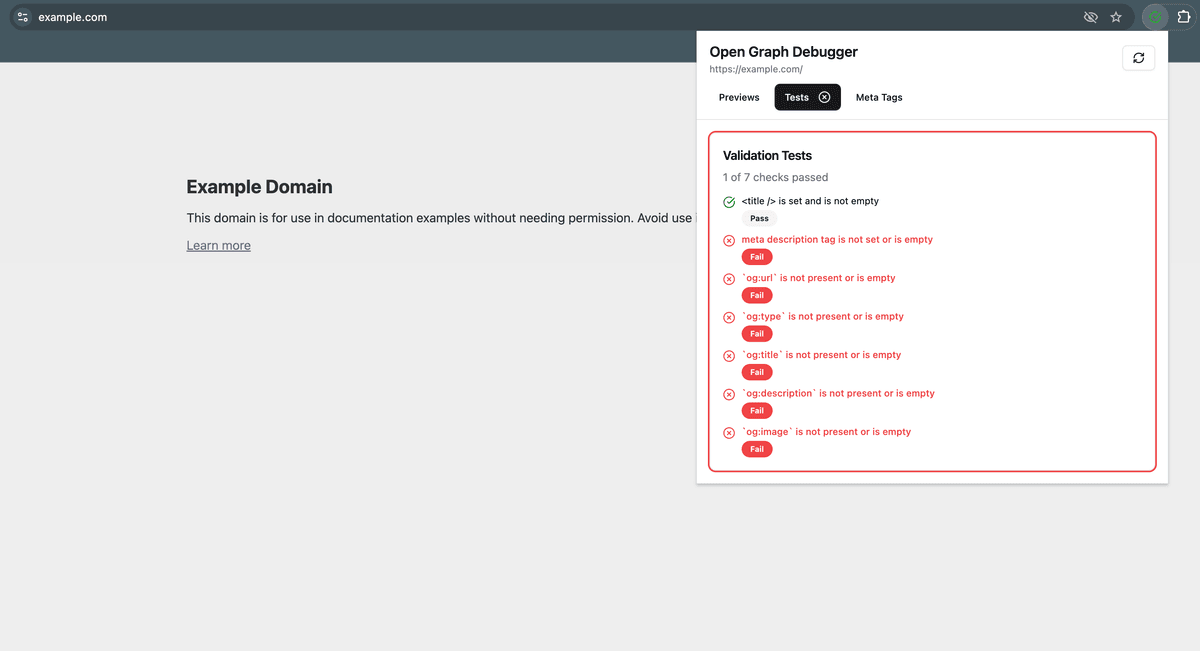
It works fast, doesn't require any setup and even access to the Internet is not required.
A Practical Workflow That Actually Works
Here’s the simplest repeatable loop for “localhost open graph debugging”:
-
Confirm OG tags are in the server HTML locally
-
Start a tunnel (ngrok / Cloudflare Tunnel)
-
Paste the public URL into a debugger tool
-
If previews don’t update, assume caching:
- re-scrape in the debugger
- or change the URL (
?v=timestamp)
-
Only then start tweaking tags/images
Final Tip: Make a “Share Preview” Route
If you work on OG images and tags often, create a dedicated internal route like:
/share-preview?title=...&description=...
It lets you iterate quickly without rebuilding real pages, and you can tunnel it just like everything else.
If you want, paste your current OG tags + what framework you’re using (Next.js, Remix, etc.), and I’ll point out the most likely reason scrapers aren’t seeing your tags on localhost.