Meta (Facebook) Sharing Debugger
A short welcome to OpenGraphDebug, why it exists, and where to start.
If your link preview looks wrong on Meta (Facebook), the Meta (Facebook) Sharing Debugger is the only tool that matters. It shows exactly what Facebook sees when it scrapes your page and lets you force a re-scrape when things go wrong.
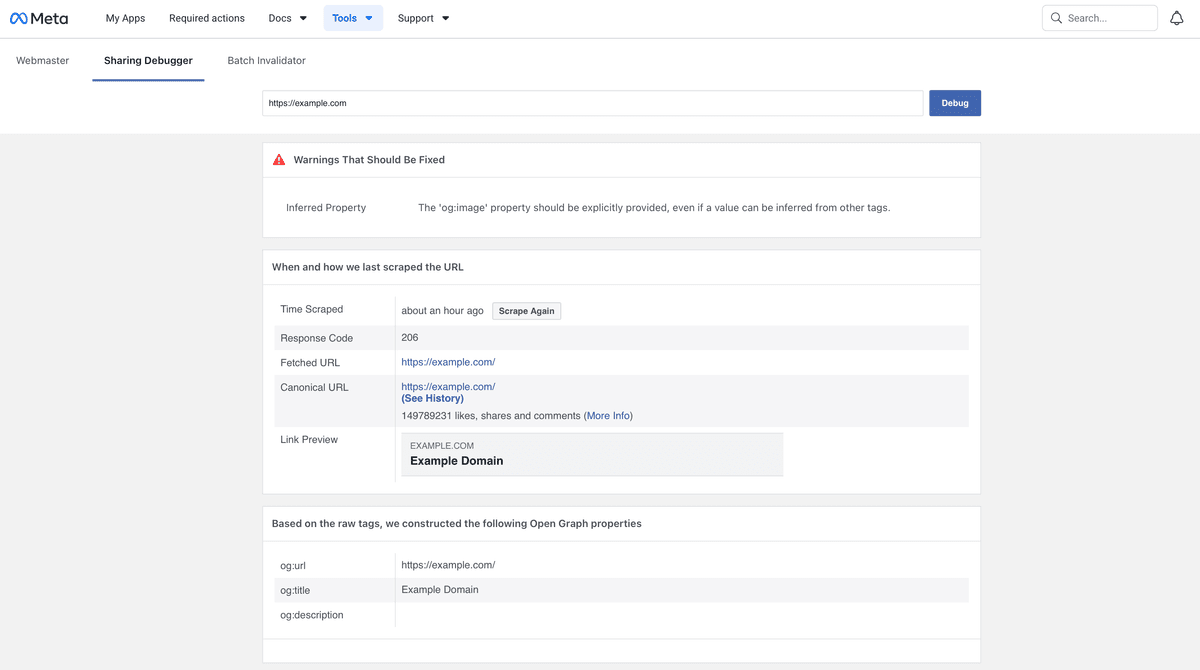
However, our OG tags tester also checks everything you need to know about your Open Graph tags for Meta (Facebook) and renders previews for other social media platforms in addition.
What Is the Facebook Sharing Debugger?
The Facebook Sharing Debugger is Facebook’s official Open Graph inspector. It:
- fetches your page as Facebook’s crawler
- reads Open Graph tags (
og:title,og:description,og:image) - shows warnings and errors
- lets you clear Facebook’s cached preview
If Facebook displays something incorrect, this tool tells you why.
How to Use the Facebook Sharing Debugger
-
Open the Facebook Sharing Debugger
-
Paste your page URL
-
Click Debug
-
Review:
- scraped Open Graph tags
- preview image
- warnings and errors
-
Click Scrape Again after making changes
That button is crucial. Without it, Facebook will usually keep showing old data.
How to Clear Facebook’s Open Graph Cache
Facebook aggressively caches previews.
To refresh them:
- Open the Sharing Debugger
- Enter the exact same URL
- Click Scrape Again
If nothing changes, modify the URL temporarily:
https://example.com/page?v=2
Facebook treats this as a new URL and re-scrapes everything.
Why Facebook Images Don’t Update
This is the most common problem. The usual causes are:
1. Facebook Cached the Old Image
Facebook prioritizes speed, not freshness. You must re-scrape manually.
2. Image URL Didn’t Change
If og:image points to the same URL, Facebook may reuse the old image.
Fix: change the image filename or add a version query parameter.
3. Image Is Invalid
Facebook may silently ignore images that:
- are too small
- have slow response times
- return the wrong content-type
- are blocked by auth or IP rules
Use a publicly accessible, fast image URL.
4. Multiple og:image Tags
Conflicting tags confuse the scraper. Facebook may pick the wrong one.
Common Facebook Debugger Warnings (and What They Mean)
- Missing og:image → no image will show in the preview
- Image too small → Facebook may fallback or crop badly
- Blocked by robots → scraper can’t access your assets
- Duplicate tags → unpredictable results
Warnings are rarely harmless. Fix them.
Final Advice
If Facebook previews break, assume:
- caching is involved
- the debugger shows the truth
- image URLs must change to force updates
The Facebook Sharing Debugger isn’t optional. It’s the source of truth for how your links appear on Facebook.
Check out our guide on the best Open Graph checker tools to validate your Open Graph tags and preview how social platforms will render your URL.